
Tuesday, October 21, 2008
Some bugs fixed...


Create Genius Playlists in iTunes on the go using ooTunes ... thank you Applescript
- This is currently only working in a regular browser (not on the iPhone yet).
- This only works on Mac's (sorry PC, you've had a rough couple of years, I know).
- This only works on Mac's when you turn on "User interface scripting" also known as "Support for Assistive Devices"...
- It requires iTunes to be brought to the front and may even have message boxes popup in iTunes on your ooTunes server computer.
- It may not work on non-english versions of iTunes.
- You have to already have the track in your iTunes library, and "Genius" has to be updated since that track was added.
(*
(C) Steven Woolley 2008, as part of ooTunes Media Server (see ootunes.com)
How to create an Genius Playlist in iTunes using applescript. More info and issues discussed here:
http://ootunes.blogspot.com/2008/10/create-genius-playlists-in-itunes-on-go.html
Feel free to use this code however you'd like, but please keep this comment intact so I hear feedback, etc., since I'd like to hear about updates, improvements, suggestions, etc.
*)
set pid to "4B62C662B53FFB94" -- set this to your track's persistent id... or use some other method to get your "seed" track
set app_name to "iTunes"
tell application "iTunes"
try
with timeout of 10 seconds -- don't want to hang forever if, for instance, iTunes has a dialog box already open
set cur_track to (first track of playlist named "Music" whose persistent ID is pid)
reveal cur_track
end timeout
on error theError
return "Can't find track!"
end try
end tell
tell application "System Events"
tell process app_name -- this needs Assistive Devices support enabled see: System Preferences -> Universal Access -> "Enable access for assistive devices"
try
set b to first button of window app_name whose help is "Start Genius." -- that's about the only way to get the "Start Genius" button, but it will break on non-english versions (I'm guessing)
tell application "iTunes"
activate
end tell
click b
with timeout of 1 second -- this is a hack to "test" if the "can't create genius playlist..." dialog opened. If it does, we'll timeout (hopefully) and then close the dialog so it doesn't freeze future applescript interaction
tell application "iTunes"
activate
end tell
end timeout
return ""
on error theError
if theError is "iTunes got an error: AppleEvent timed out." then
key code 36 -- close the dialog
return "Can't create genius list from that track!"
end if
return theError
end try
end tell
return "Error creating genius playlist!"
end tell
Friday, October 10, 2008
Why you can not play live video on the iPhone
- There is nothing built in to the iPhone to handle true rtsp streaming
- The only formats available to be played on the built in video player are .mov, x264 or mpeg4 all of which require a frame index in the moov atom at the beginning in order to be played as they're downloaded. Unfortunately, for a live stream such information is simply not available until the encoding is finished.
- Should you desire to build your own video player, the SDK doesn't give access to the private frameworks that apple uses for video decoding or the raw framebuffer that a player would need to have fast display. There are workarounds (that are suboptimal) but no one can show source thanks to the developer NDA that is still in effect. (technically this comment is probably out of line, though I've gleaned it from reading/searching the web, NOT from the sdk).
- Without proper hardware optimized methods, you're going to be a battery hog, and probably limited in resolution.
- Now, imagining that all of the above is somehow overcome (which I am sure it has been by some)... now the question is: "Will apple accept your app into the store?" It is against the terms of most (if not all) service provider's agreements to stream live anything (and video isn't going to be low bandwidth).
- Figure out a way to encode live video with predictable metadata (fixed frame boundaries and packet sizes)
- Write your own video player from scratch to decode whatever type of stream you want (remember 3, 4 and 5 above)
- File feature enhancements and otherwise petition Apple in hopes that they'll add support for RTSP or change their SDK to allow for this.
- Encode in short snippets and try to play them back to back seamlessly, with no breaks... this way you almost have live video (delayed by the amount of time to encode and start playing a single snippet).
- Give up on it?
Wednesday, October 1, 2008
Woohoo! Apple finally drops NDA on iPhone development!
Thursday, September 18, 2008
hallelujah!
- It forced me to finally get Real Audio streams to work
- It made me realize I really need a way to add streams directly from ooTunes (it's about half implemented already)
- I can FINALLY get back to listening to my own music and streams (instead of having to listen to conservative talk shows, sports shows, religious shows, and boring political news)
Tuesday, September 9, 2008
Are Genius playlists the beginning of the end for last.fm and Pandora?
iTunes' new Genius playlists are, well, genius! With one of the most installed and (more importantly) most used music players apple would be foolish to NOT get users' play data and
- use it to make their offerings better and
- use it to PROFIT!
So my initial impressions:
It is a bit scary signing up... anonymous, but... um, yeah, give us your iTunes Store account name and password... but it's anonymous, we promise! Did we mention how anonymous it is? Well it is totally anonymous!
I'm not a "privacy" nut. I recycled my tinfoil hat for some quick cash. If I was, I wouldn't be blogging, or scrobbing with last.fm, etc. I understand why they need the "privacy policy" and your account info (in fact, I actually read the privacy policy associated with enabling Genius in its entirety... it's actually short and sweet). It's not a super big deal, and I applaud apple's upfrontness about it.
Okay, one hurdle down. Next iTunes spent an hour or more reading my library and playcounts, dates, ratings, etc (it was probably closer to an hour and a half, but I have something like 14,000 tracks so your ymmv). Then, after telling me it had been submitted, I was informed that Apple was
processing the data. A few minutes later: Success!
"You can start pestering the Genius!" <-- this is NOT what it said, I forgot...
So, I tried it out, and it did a pretty good job, at least on the first few attempts, at least with the non-obscure stuff.
Biggest rightside downside?
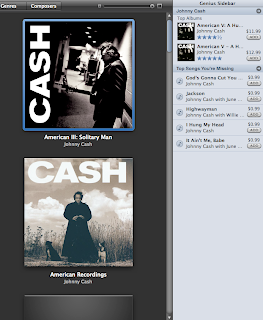
The Giant Genius sidebar... of course. If you're like me, you may just want to hide that Genius sidebar right off the bat. I refuse to buy tracks from the iTunes library before looking around to see if I can buy the real physical cd online for less. I like tangibles, and don't mind the wait for delivery and ripping, but I'm probably in the minority there, given the success of the iTunes music store and certain less legitimate
means... Of course the sidebar might be good for recommendations even if you don't buy from iTunes, so I'll look into it eventually I'm sure.
(NOTE, I do applaud that it recognized probably the only major Johnny Cash album that I don't (yet) own, and didn't try to re-sell me all the stuff I already bought... that is smart use of info... something that last.fm and pandora really CAN'T do, at least not very well).
So, is this really the end for last.fm and pandora? Not really... Until Apple/iTunes will let you actually play stuff (more than 30 seconds) from songs you don't yet own, they can't compete with the music discovery aspect of those guys... but if I were an investor in last.fm/pandora, I'd be a bit scared (given the licensing costs we've heard about...) and now this encroaching by Apple. But, oh well, I'm pleased with apple's move, and competition is a good thing, right? Right?
And the best part of it all? ooTunes didn't break with the update to iTunes 8.0! In fact, genius playlists just show right up (both in a regular browser or in the iPhone). The only problem is that it doesn't use a neat new icon for Genius lists (kinda gonna be hard to come up with an icon more genius than nerdlinger,

but I guess we can give him a pocket protector or einstein hair or something. Look for an update soon that fixes that minor issue, and HOPEFULLY a way to create a genius list on the fly, through ooTunes, using not only iTunes tracks, but maybe even pandora, last.fm, seeqpod, or other tracks (no promises on this, but if it's possible, I'll do it!).